Samsung has just lifted the cover off a brand new version of its virtual reality headset: the Samsung Gear VR.
Coming
right along the new Samsung Galaxy Note 7, the new Gear VR is USB-C and
Note 7-compatible, and its most important improvements come in the form
of more padding and longer straps for overall improvements in comfort.
In addition to the USB-C connector for the Note 7, there's also an
adapter that allows you to plug in older Samsung phones with the
microUSB port.
At its core, this new version of
the Samsung Gear VR remains looking practically the same: you insert
your Samsung phone in the front and get immersed in the 360-degree
virtual reality world powered by Occulus.
Aesthetically, it's also just plain cooler: that new
black color makes it stand out and gives it a bit more of a futuristic
look, but - of course - that's all a bit subjective. The full list of
phones compatible with the new Gear VR includes: the Samsung Galaxy Note
7, the Galaxy S7 and S7 edge, the Note 5, Galaxy S6 and S6 edge, and
the S6 edge+.
The list of more minor changes
includes a slightly wider field-of-view of 101 degrees versus the
96-degree on the earlier Gear VR, and then
The new Samsung Gear VR will go up for pre-order tomorrow, on August 3rd, and the official release date is set for August 19th.
Slide any Ara module into any slot and it just works. Powering this simplicity is Greybus, a new bit of software deep in the Android stack. Greybus supports instantaneous connections, power efficiency and data-transfer rates of up to 11.9 Gbps.
Built to Last
The Ara frame is built with durable latches and connectors to keep modules secured. Ara modules are designed around standards, allowing them to work with new generations of frames and new form factors.
Build With Us
More Space. New Ideas.
The Ara frame contains the CPU, GPU, antennas, sensors, battery and display, freeing up more room for hardware in each module. We are looking to module makers to create technology never before seen on smartphones.
Hardware’s API
The Ara baseplate provides an instant connection to the Ara frame and its core technologies. That means less time fiddling and more time building.
Open Marketplace
We're hard at work on an open marketplace to connect the next generation of ideas with the broader Ara community. Google is looking for beloved brands and forward-thinking developers to join us.
Microsoft’s Anniversary Update was supposed to take the Windows Hello
biometric authentication system a step further, finally delivering on
the “Passport” promise of the original OS: Your face or fingerprint
would serve as your password for the web as well as your PC. Microsoft
executives tell me Hello will take on this new role once the FIDO 2.0
standard officially rolls out in a few months. For now, Hello is now
used to authenticate you at the Windows Store.
You’ll soon have the option to secure purchases at the Windows Store with your face or fingerprint.
Microsoft’s original Surface tablets used a depth camera to snap a 3D
image of a user’s face, identifying and logging them in. Now, Hello has
become even more accessible, as more hardware makers adopt fingerprint
readers. Both bits of hardware work exceptionally well—and if they
don’t, there’s always a PIN or Microsoft password alternatives.
Now, Microsoft is pushing Hello beyond your login screen, and the
first stop is the Windows Store. The AU code now uses Hello to buy apps,
music, and more. What’s the difference between tapping a button to
approve a stored credit card, versus using your face? Not that much, though the transaction is authenticated via the hardware in your PC, providing an additional assurance that you are you.
I still think replacing passwords via biometrics is the future of
shopping on the web, but restricting it to Store purchases helps ease
users into this new technology. A lot is going to depend on which sites
adopt Hello authentication, especially banking sites.
Cortana: Eager to please, and with a better memory
If you believe that Microsoft is the devil in Redmond, gobbling up
your data to pass along to advertisers (or worse), nothing about
Cortana’s latest features will change that. (But you’ll be happy to know
that the French government agrees with you.)
That said, the Cortana digital assistant has steadily improved since
the initial release of Windows 10. The Anniversary Update presents a
Cortana that’s more aware of you than ever, assuming you allow her access to your life. (In the Anniversary Update, you can't turn Cortana off, though you can periodically wipe out her memory by erasing what she knows and by disabling Windows's 10 personalization features via the Privacy options in Settings.)
You can't turn technically turn off Cortana in the Anniversary
Update, but you can make her deaf, dumb and blind if that's what you
want.
Cortana can now speak several languages, sniff your email for flight
times and other pertinent data, and more. Two key additions make Cortana
especially useful, however: Her hangout on your lock screen, and her
ability to remind you of basically anything.
With the Anniversary Update for Windows 10, you can view a simplified view of your calendar on your PC’s lock screen.
This is a great trick: You can holler across the room—“Hey
Cortana!”—and trigger a few actions on the lock screen, without needing
to log in. Cortana can tell you your upcoming appointments, or even tell
you a joke. One of the product managers responsible for Cortana told me
that she likes to see her calendar on her screen across the room, and
she’s right—that sure is handy.
The other useful addition to Cortana’s repertoire is that you can now
set a “reminder” for a random fact: “Remember that my room number is
1443,” or “remember that my nephew likes Ghostbusters toys.” Later, when you need to, you can then ask “What is my room number?” or “Tell me the toys my nephew likes.”
The best summary of Cortana’s capabilities lies within the Cortana
Notebook, where you’ll find all sorts of little tidbits: Do you want
Cortana to know when you typically eat lunch, and schedule around it? To
connect to your fitness tracker? To make restaurant recommendations? I
fire off reminders to myself all the time, just by yelling at Cortana
while tapping away at something. And you can send texts to Android and
iOS phones, too, if you’ve installed the Cortana app.
Cortana does ask for information from a variety of connected
accounts, though they’re off by default. In part, that’s to help you
plan out getting to and from meetings, say, via Uber.
Edge: extensions make the difference
Edge, Microsoft’s integrated browser, was a glaring flaw in the
original Windows 10 release: too spare, too slow. Even now, as Windows
10 boasts a decent 19.1 percent
market share, Edge’s share sits at just 5.1 percent. It still deserves
mention here, though, because it’s steadily and surprisingly improved
over time (although no specific improvements are really recent enough to
be part of the Anniversary Update). Edge now syncs data with the cloud,
adds extensions, and even offers integration with Cortana.
As long as you confirm your identity, Edge Favorites and passwords
should now be exchanged among Windows 10 devices you have keyed to your
account.
When Windows 10 debuted, neither Edge’s Favorites nor
its stored passwords easily synced with the cloud, which is especially
frustrating when moving to a new PC. There were workarounds—I could
store favorites in Chrome, install the browser, load the favorites, then
export them to Edge—but that was a pain. Now, as long as you sync
everything to your Microsoft account, all of that data should roam
between devices. Just make sure to visit Settings > Accounts > Sync your settings and verify your identity.
More than a dozen extensions add some long-awaited, and much-needed, extensibility to Microsoft’s Edge browser.
The Anniversary Update code now contains support for extensions, a
feature the original version of Edge notably lacked. At press time, 13
Edge extensions are available via the Microsoft Store, none of them
fluff: AdBlock and AdBlock Plus, the LastPass free password manager, an
Evernote Web clipper, and more. They’re easy as pie to install: Simply
go to the ellipsis menu at the upper right, scroll down to Extensions,
and install them like any other app. (For more detail, check out PCWorld’s guide to effectively using Microsoft Edge).
Whether you like the new Edge depends on whether you have an ad
blocker installed. Without it, web browsing still remains choppy. With
it turned on, though, Edge now is in the same league as other browsers,
rendering webpages about a second slower than the competition. I still
found Edge somewhat unstable, though, crashing on media-rich pages at
such sites as CNN.com and SFGate.com even with ad blocking on.
Fortunately, such crashes rebooted the tab, with no apparent ill effects
to the other tabs. I just hope that the crashes can be chalked up to a
bad ad, rather than an issue with the Edge code.
The new Edge extensions sit in the upper right, and can be accessed
via the ellipsis menu. Note that you can turn them on or off as you
wish.
We all shop online, and Edge has added a few handy features. Edge is integrated with Cortana,
so the digital assistant will return results using Bing and Edge, that
she can’t find herself. Better still, when you visit a shopping site
like BestBuy.com, she’ll offer you a coupon. (Check out the MacBook Air
discount!)
Visit a site like Target.com or BestBuy.com, and Cortana will offer a coupon to help you shop.
Right-click an image (of a dress, lawn mower, or whatever) and
Cortana will pull up a sidebar with price and availability at various
online locations. I’m not ready to call Edge a great browser, but it’s
risen to the level of acceptable.
Microsoft Edge allows you to right-click an image and “ask Cortana”
to find places where you might be able to buy the object in question.
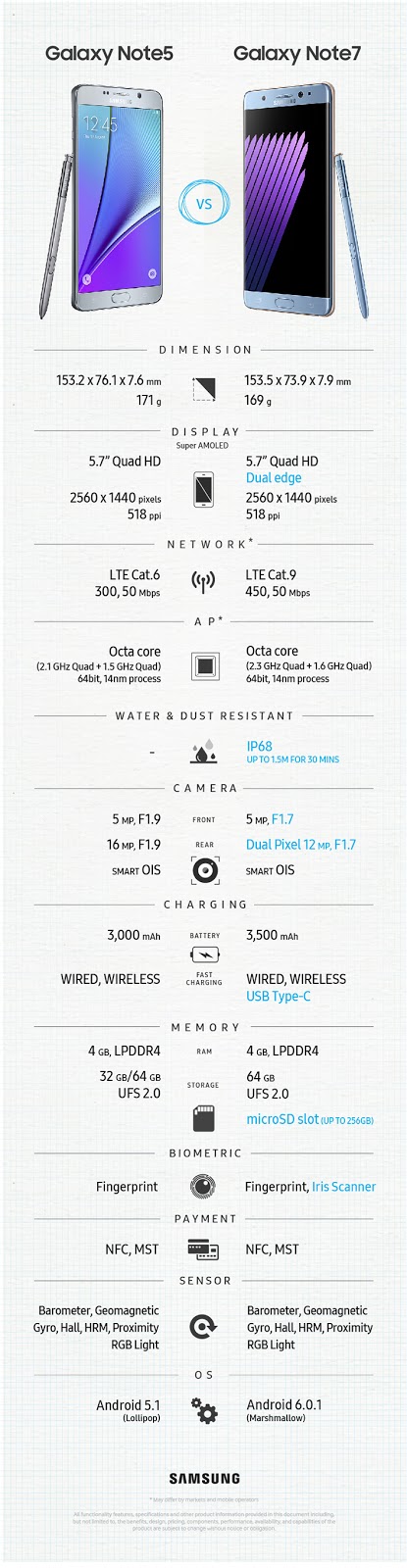
the Galaxy Note 7 is the best smartphone Samsung has made in 2016 . It combines the screen size and S Pen of the Note series with the slim body and Edge panel of the Galaxy S7 Edge into one helluva great phone. It really is the best of both worlds. Here are our hands-on impressions.
Smooth, symmetric design
Samsung took all the lessons it learned from the Galaxy S7 Edge and put them into play on the Note 7. When you hold the Note 7 next to the Note 5, it looks so much smaller, even though the 5.7-inch screen size is the same. The body of the phone is slimmer, sleeker, and more comfortable to hold. Samsung shaved off a couple of millimeters from the Note 5’s width to make the Note 7 nearly as slim as the S7 Edge. If you thought the S7 Edge was comfortable in your hand, wait until you get your hands on the Note 7. It’s one of the most comfortable phones we’ve ever held. Samsung fused together two identical pieces of curved glass onto the back and front of the device, so that it curves perfectly into your hand – no more sharp edges. The aluminum frame is super slim on either side of the device, so you barely notice that it’s there — all you feel is the cool curve of glass warming against your hand. The perfect symmetry of the Note 7 adds to comfort, grip, and style. It also looks stunning, especially in the new blue color, which I would almost describe as periwinkle (shh, don’t tell all the men who will love this color). Of course, you’ll quickly mar the Note 7’s perfect surface with fingerprints. It is still an all-glass phone, so if oily smears bother you, you’ll need a case. The fragility of glass is another matter, especially now that the metal frame is slimmed down; the glass is even more exposed to danger if you drop your phone. We highly recommend you buy a case to keep your Note 7 safe – even if Gorilla Glass 5 is supposedly super strong. Luckily, though it’s fragile, it is waterproof (“resistant” is the technical term) thanks to the IP68 rating.
Regardless of our quibbles about the glass, the Note 7 is a sight to behold, especially in the silver and blue color options, both of which hide fingerprints a bit better than the black one. Sadly, the gold version is not U.S. bound at the moment, because each market only gets three colors.
Same killer specs as Galaxy S7 Edge
In terms of specs, the Note 7 is a powerhouse just like the Galaxy S7 series. The Note 7 boasts the same dual-edged Super AMOLED screen as the S7 Edge with a Quad HD 2,560 x 1,440 pixel resolution, but it’s size is 0.2-inches bigger at 5.7 inches. The new Note is powered by a top-of-the-line Qualcomm Snapdragon 820 processor and 4GB of RAM, just like the S7 Edge, so it should be equally speedy. Samsung did simplify things in terms of storage. You can only buy the Note 7 with 64GB of storage, but it is expandable with a MicroSD card up to 256GB, so you should be fine. Like most recent Samsung phones, the Note 7 supports Samsung Pay. The same 12-megapixel back camera and 5-megapixel front-facing camera that graced the S7 Edge are present on the Note 7, too. In our S7 Edge review, we found the camera to be just as good if not better than the iPhone 6S Plus’ camera. We have to test the Note 7’s camera to be sure, but since the specs are the same, we expect similarly strong photography from the Note 7. Rounding out the specs is a 3,500mAh battery, which charges up wirelessly or via a USB Type-C port. The Note 7 is the first Samsung phone to sport a USB Type-C port, and the company even made a new Gear VR headset for it that uses either Type-C or a Micro USB port to connect to your phone.
Security and an iris scanner
Security is more important than ever on our phones, so Samsung doubled up on biometrics with the Note 7. It has both a fingerprint sensor and an iris (eye) scanner. You can choose to use either one, both, or neither when you set up the phone. The iris scanner is super fast and we saw it demoed with glasses, so it appears to work around some obstructions. However, we’ll have to test it out to see how well it does in real life. Iris scanners are finicky, after all. Luckily, the fingerprint sensor is a nearly fail-safe backup if the iris scanner fails. Samsung pointed out that you could use the iris scanner when your hands are wet and the fingerprint sensor can’t read your print. The iris scanner is also supposed to be more secure and less easy to dupe than a fingerprint scanner, so Samsung put it to work on a new security-focused feature called Secure Folder, which is protected by Knox. Basically, the idea is that you can put documents, notes, pictures, and even apps into the Secure Folder when you don’t want anyone to see them. The folder uses Knox and encryption to keep your most sensitive data safe. It is locked even when your phone is unlocked, and you have to use the iris scanner or fingerprint sensor to unlock it. It’s easy to remove or add files to the folder.
Samsung’s TouchWiz UI gets a makeover
While most companies that make Android phones have taken pains to tone down or even eliminate the customized user interfaces they put on top of stock Android, Samsung has stuck stubbornly to TouchWiz. Anyone who’s exclusively used a Samsung phone over the past few years has seen a whole lot of TouchWiz and very little Android. There’s nothing wrong with the UI, but it doesn’t look terribly modern and Android purists tend to grimace when they look at it. Not anymore. Samsung revamped TouchWiz to make it look more modern and polished. The changes are subtle and very tasteful. Honestly, we barely even noticed what was different until we opened the Settings menu. Because we’re total nerds, we literally oohed and ahhed when we saw the changes.
Jeffrey Van Camp/Digital Trends
In the new version of TouchWiz, all your settings are tastefully organized on a white background with great pops of color here and there. It’s so beautiful to look at and easy to navigate. After we discovered the new Settings menu, we started poking around the device for more changes. Beyond a few new apps and Samsung app updates, the biggest visual changes can be seen in the Samsung app icons. Gone are the cartoonish app icons of the past, and in their place are colorful, flat, simple, and attractive icons. They almost look like the kinds of icons you see on iOS, which is to say, they’re works of art in their own regard. Related: Whip out that S Pen! 6 apps to use with the Galaxy Note 5 The changes to TouchWiz are very welcome, and for once, we’re almost glad Samsung isn’t a fan of Google’s stock version of Android. Since the Note 7 is technically an Edge phone, too, it has all the same Edge panels as the S7 Edge. You can download new ones from the Samsung app store or just use the app shortcuts, contacts, and other edges Samsung has pre-loaded on the device. The Edge is much more useful than it used to be and we’re glad to see it on the Note 7. It’s a stronger device with both the Edge panels and the S Pen.
Amazing new S Pen
Samsung made the stylus cool again with the first S Pen, and the latest one is better than ever. The Galaxy Note 7’s stylus supports 4,096 points of pressure, which is double the amount that most styli offer. That means more pressure sensitivity, so the S Pen will know whether to make a sketchy fine line or a bold strike. Extra accuracy will certainly appeal to artists, but it’s also beneficial to note takers. The pen tip is closer to ballpoint size, too, at 0.7mm. It doesn’t drag, either, so the S Pen slides smoothly across the surface when you’re writing or drawing. Samsung also made the S Pen water resistant with an IP68 rating, so you can write underwater. Of course, Samsung fully understands that you won’t go scuba diving with your Note 7 to sketch some coral, but you may need to use the S Pen when it’s raining or your fingers are damp.
The S Pen has always been my favorite Note feature, but now it’s better than ever.
Other new features include the ability to pin notes to the Always-on display for quick access, create scrollable notes, make and share GIFs with Smart Select, translate text into 38 languages with Air Command, open a magnifying glass to increase text size up to 300 percent, and click a single button to erase. All of these features take the S Pen to the next level. Finally, there’s an improved S Notes app, which houses all you S Pen creations in a searchable, simple app. You can create new notes right in the app instead of having to pop your S Pen in and out to conjure the Notes app. When you create a new note, you get several options, including one for artists, which now supports color blending, so that your paintings look more like real oil paintings. You can even share your creations in the Pen Up social community for S pen artists. Apparently, PenUp has been around for a while, but Samsung is actually highlighting it now with a cool new app icon on your home screen. The S Pen has always been my favorite Note feature, but now it’s better than ever.
Conclusion
The Galaxy Note 7 looks like a very promising device. It is as beautiful as the S7 Edge, but it’s as functional as every other Note before it. The Note series is one of our personal favorites and we’re glad that Samsung is folding the Edge into the Note. It makes for a truly unique and well-rounded device. Obviously, we can’t pass much judgment on the Note 7 yet, so stay tuned for our full review. Samsung hasn’t divulged pricing info at the time of writing, but here is the info on how to get your hands on the latest Note. In America, the Galaxy Note 7 will be available in Blue Coral, Silver Titanium, and Black Onyx. You’ll be able to pre-order one at AT&T, Sprint, T-Mobile, U.S. Cellular, and Verizon Wireless stores on August 3, but the Note 7 won’t hit stores until August 19. It’ll also be available at Best Buy, Amazon.com, BestBuy.com, Car Toys, Sam’s Club, Target, and some Walmart stores. Samsung also has a new deal for those who buy a Galaxy Note7 or Galaxy S7 Edge. You can get a free Gear Fit 2 or a Samsung 256GB memory card. We personally recommend the Gear Fit 2, which we considered better than a Fitbit in our review.
The screen is larger, yet somehow the phone doesn't feel too much bigger in the hand. The rear of the phone is now curved too, making it sit nicely in the hand. It's waterproof. There's a microSD card slot. There's so much power in there I'm pretty sure I could strap it on the back of a speedboat and make my way across the Atlantic.
And that's even more possible because the battery – such a disappointment on last year's S6 phones – is boosted massively too, giving us a handset that's able to last over 24 hours between charges.
All this comes at a cost obviously, and a pretty hefty one. In the UK that cost is £640, while in the US you're looking at a huge $299 on a two-year contract, or the new unlocked price of $769. In Australia, the Galaxy S7 Edge attracts the highest price for a Galaxy yet: AU$1,249 for the 32GB version.
That's quite a jump from last year's AU$1,149 starting price, showing this is one of the most expensive phones around.
But, in my view, it's worth every penny.
Design
The Galaxy S7 Edge is a phone that lives and dies by its looks. If you're only interested in the power then just go for the standard Galaxy S7. The smaller, 'normal', model has got all the same smarts, but a slightly sharper screen thanks to packing the same amount of pixels into a smaller area.
What it misses is the clever elements that Samsung's used on the Edge. The display curves further away into the sides of the phone than ever before, which means that even though you've got a phablet-sized display, the phone is as compact as possible.
Place it side by side with the iPhone 6S Plus and you'll see what I mean. The amount of bezel used above and below the display on Apple's phone is almost laughable, especially when you compare it to how tightly packed everything is on the S7 Edge – and the Samsung has a much, much larger battery.
The S7 Edge is shorter and narrower (150.9 x 72.6mm) than the 6S Plus (158.2 x 77.9mm), even though both devices have the same 5.5-inch screen size. The iPhone is however, a hair thinner at 7.3mm versus the Samsung's 7.7mm girth.
It's also very similar in size to the LG G5 (149.4 x 73.9 x 7.7 mm), which again sports a 5.5-inch display - with the Android manufacturers really sticking it to Apple.
One of my favorite parts of the design upgrade on the S7 Edge comes on the rear. A process called 3D Thermo Forming – which sounds like it's been named by a sentient marketing machine – enables the brand to curve the rear of the phone into a single metal rim that runs all around the edge.
It's a feature that was used last year on the Note 5 (and is also used by brands like Xiaomi) to really help the phone slip into your palm and remove any sharp metallic edges.
Combine that with the same curve on the front of the device and you can see why it feels so smooth in the hand, almost pebble-esque in the way you can roll it around in your palm.
Intriguingly, this has left some people with the impression that it's not quite got the same premium feel as previous Samsung phones. By having less metal to grasp on to you're touching the Gorilla Glass 4 covering, which can feel a little like plastic due to its lightweight (but still very strong) construction.
Tap the back of the phone and it lacks the sheen of metal, but in fairness that lack of metal allows for the wireless charging that's a key feature of the S7 Edge.
That back does have one issue though: it's a fingerprint fairground, a veritable carnival for any crime scene investigators looking to nab you for some dirty villainy.
So many phones have that criticism thrown at them, but it's particularly true for Samsung's new curved phone. It's easy enough to wipe the sticky offenders off, but it's annoying to have to do it time and again.
The camera protrusion on the rear has been reduced to just 0.42mm, which means it's barely noticeable when you're placing the phone down, while still being strong enough to help protect the lens.
And then you remember something else: this phone, with its elegant rim and clean lines, and complete with exposed ports, is waterproof.
No, sorry, water-RESISTANT, as it's IP68 rated. That means it's still able to work after being dunked in fresh water for 30 minutes up to a depth of 1.5 metres, so you'll be able to use it happily in the bath, or beside the shallow end of the swimming pool, and not worry about dropping it.
It's less of a 'let's take our phone scuba diving to get some amazing pictures' feature, and more of a safety feature – and the phone will even refuse to charge if the port is too wet, such is its ability to manage moisture.
Sadly, you're still left with a single speaker firing out the bottom of the Galaxy S7 Edge, which doesn't really have the most premium of sound; however, it's serviceable, and noticeably louder than other mono speakers I've used.
Overall, I can't speak highly enough of the S7 Edge's design. It feels amazing in the hand, and Samsung has managed to bring enough upgrades to make this look and feel like a completely different phone; and most people trying it for the first time will – even if they're not a fan – be able to appreciate something different in a world filled with black, rectangular slabs.
Screen
The display, while technically part of the Galaxy S7 Edge's design, is worthy of chatting about in its own right – simply because it looks so great.
It's the defining feature when you pull this phone out among friends, and while it doesn't elicit the same response that the S6 Edge's display did last year (like I said, curved displays are nothing new these days), it still gets a lot of approving looks, especially as it's combined with the rounded back.
The QHD resolution of 2,560 x 1,440 still looks as good as anything I've seen on a smartphone. Despite being stretched a little from last year, the 5.5-inch size still looks absolutely pin-sharp, and it's very hard to see any artefacts lying around on the screen.
It's amazing to think that, two years after LG brought out the first mainstream QHD phone, we still don't have any dedicated content that can be viewed at this resolution. Despite that, however, I don't feel like the Galaxy S7 Edge really suffers, as that display makes viewing web pages and photos a really great experience.
The S7 Edge uses Super AMOLED technology, which Samsung's been chucking out for close to a decade now, and it really works well to make the phone look premium and the colors really pop.
The contrast ratio – the difference between the whitest whites and the blackest blacks – is still pretty sensational, which is because when they're not in use, the pixels are turned off; with something like the iPhone 6S or the LG G5 you've got a display that just blocks out the backlight when the pixel is showing a black image, so there can be a small amount of light bleed-through.
The Galaxy S7 Edge screen also has the added benefit of the side display, which is accessed by swiping your thumb along from the right- or left-hand side of the phone's screen (you can specify which in the settings).
Where this was a nonsense, useless feature in years gone by, the side display has a much more defined role on the Galaxy S7 Edge. You can easily get access to news, regular contacts, tools (the ruler, for digi-measuring is back – GET IN) and other elements that are currently in development.
Check out the Specs and Performance section of this review to hear a little bit more about this feature – or skip it entirely if you're bored of hearing me witter on about a piece of the display you can swipe.